Xentral vs. Billbee 2026 - The Honest Comparison
Xentral or Billbee? Features, pricing, pros and cons compared head-to-head. Which ERP fits which business? Includes a real-world migration report.

Xentral or Billbee? The Short Answer
Billbee for beginners and small shops (< 500 orders/month, < €500k revenue). Xentral for growing businesses (> 500 orders/month, > €500k revenue).
| Criterion | Billbee | Xentral |
|---|---|---|
| Price from | €9/month + orders | €99/month (Launch) |
| Setup | Self-service in 1–2 days | With consultant 2–4 weeks |
| Automation | Basic rules | Flows (complex no-code) |
| DATEV export | Limited | Full |
| Best for | Solo sellers, starters | SMEs in growth phase |
Rule of thumb: When you notice Billbee hitting its limits, Xentral is the logical next step.
"Should I go with Xentral or Billbee?"
I hear that question almost every week — and it's entirely justified. Both systems have established themselves in the German e-commerce space, both promise efficiency and time savings. But the decision is more complex than a simple feature comparison, because the right choice depends heavily on your business situation.
Over the past few years, I've got to know both systems in depth — as a user, as a consultant, and as the person who has guided dozens of migrations from Billbee to Xentral. I'd like to share that experience here so you can make an informed decision.
Disclaimer: I work as an Xentral consultant, but I'm trying to keep this comparison as objective as possible. Sometimes Billbee genuinely is the better choice — and I tell my clients that too.
When Do You Face This Decision?
The question "Xentral or Billbee?" typically arises in three situations. The first and most common involves founders and newcomers choosing their first system. You've built an online shop, the first orders are coming in, and Excel is slowly becoming unmanageable. You need an inventory management system — but which one?
The second situation affects merchants who started with Billbee and are now growing. The automation is no longer sufficient, the accountant is complaining about the DATEV export, or you're hiring your third employee. Suddenly you notice: Billbee is hitting its limits.
The third situation involves businesses switching from another system and evaluating both options. Perhaps you're currently using JTL, Pixi, or a custom solution and want to move to the cloud.
Regardless of which situation applies to you — the following information will help you decide. I won't just compare the bare features, but also explain the differences that truly matter in everyday operations.
Expert assessment: "Billbee is like a bicycle — simple, affordable, ready to go quickly. Xentral is like a car — more investment, but you get further and faster." — Fabian, XentralExperte.at
What Is the Difference Between Xentral and Billbee?
Before we dive into the details, here's a brief overview of both systems to set the context.
Xentral – The Enterprise ERP for Growth
Xentral's roots go back to 2008, when founders Benedikt and Claudia Sauter in Augsburg developed their own ERP solution for their hardware shop. The software was initially called "WaWision" and was renamed "Xentral" in 2017 when the company focused entirely on the ERP software. Since then, Xentral has received significant venture capital investment from Sequoia, Tiger Global, and others, and has developed into the leading cloud ERP for mid-market e-commerce businesses.
What sets Xentral apart is its focus on automation. The no-code automation platform called "Flows" enables complex workflows without programming. More on that in the Xentral Flows documentation. In addition, a comprehensive API makes Xentral the backbone of a modern tech infrastructure.
Xentral's customer base of over 2,000 companies consists mainly of growing SMEs with annual revenues between €500,000 and €10 million. Many well-known D2C brands and scale-ups such as YFood, KoRo, and The Nu Company use Xentral as their central system.
Billbee – The Easy Entry Point
Billbee GmbH was founded in 2015, with the software's origins dating back to 2009. It was one of the first German cloud tools specifically for e-commerce merchants. The company has deliberately focused on simplicity and affordability.
Billbee's strength lies in its low barrier to entry. The system is intuitive to use, quick to set up, and with a usage-based pricing model starting at €9 base fee plus approximately €0.08–0.24 per order, it's affordable even for beginners. With over 20,000 customers, Billbee has the larger user base, which is mainly due to its popularity among micro-merchants and side-hustle sellers.
Billbee doesn't position itself as a full ERP system, but as inventory management software for multi-channel commerce. This positioning is honest and helps to put things in perspective.
Feature Comparison in Detail
Now let's get specific. I'll compare the most important functional areas and explain what the differences mean in practice.
Order Processing
| Feature | Xentral | Billbee |
|---|---|---|
| Multi-channel import | Yes | Yes |
| Automatic assignment | Yes | Yes |
| Order picking | Extended | Basic |
| Partial deliveries | Yes | Yes |
| Drop shipping | Yes | Limited |
On paper, both systems look similar when it comes to order processing — and for simple scenarios that's accurate. Both reliably import orders from Shopify, WooCommerce, Amazon, and eBay. Both can generate shipping labels and feed back tracking numbers.
The difference shows up in more complex workflows. If you need partial deliveries with automatic stock reservation, if orders need to pass through different departments, or if you want to map drop shipping with automatic supplier notifications — that's where Xentral demonstrates its added value.
A concrete example from my practice: a client had the issue that some items were shipped from their own warehouse, others via drop shipping, and others from a consignment warehouse at a fulfillment service provider. This logic could be cleanly automated in Xentral via Flows, whereas Billbee required manual intervention.
Warehouse Management
| Feature | Xentral | Billbee |
|---|---|---|
| Multi-warehouse | Yes | Yes |
| Storage locations | Yes | Basic |
| Batches/serial numbers | Yes | No |
| Stocktaking | Yes | Basic |
| Minimum stock levels | Yes | Yes |
Warehouse management is one of the areas where Xentral and Billbee differ most significantly. Billbee was designed for merchants who think of their warehouse more as a "storage room with a system" — meaning they want to know what's there and when to reorder.
Xentral, on the other hand, offers genuine warehouse management as you'd expect in a professional environment. You can define specific storage locations, track items at batch or serial number level, and conduct stocktakes using various methods.
For a merchant storing 200 items in a basement room, that's overkill. For a business with a 500 square metre warehouse where three employees work, it's essential. The question is: how professional are your warehouse processes today — and how should they look in two years?
A point that's often overlooked: batch and serial number tracking is legally required in some industries. If you sell food, cosmetics, electronics, or certain medical products, you need clean traceability. Billbee can't do that.
Accounting & DATEV
| Feature | Xentral | Billbee |
|---|---|---|
| DATEV CSV export | Yes | Yes |
| DATEV XML + PDF | Yes | No |
| DATEV Unternehmen Online | Yes | No |
| Automatic export | Yes | Basic |
| Open items | Yes | Yes |
| Dunning | Yes | Basic |
Accounting integration is often the decisive factor in switching from Billbee to Xentral. Both systems can export DATEV-compatible CSV files — that's the lowest common denominator that almost every accountant can process.
The difference lies in the depth of integration. Xentral can export XML files with associated PDFs that DATEV processes without manual rework. Even better: Xentral supports DATEV Unternehmen Online, which automatically transfers documents to the accountant's cloud.
What does that mean in practice? I had a client whose bookkeeper spent two days every month preparing Billbee exports for the accountant. After migrating to Xentral, it took two hours — the remaining time could be used more productively.
If your accountant uses modern DATEV and you want efficient collaboration, Xentral is the better choice. If you have an accountant who manually enters everything anyway, it makes no difference.
Integrations & Marketplaces
| Integration | Xentral | Billbee |
|---|---|---|
| Shopify | Connect | Yes |
| WooCommerce | Connect | Yes |
| Amazon | Yes | Yes |
| eBay | Yes | Yes |
| Otto | Mirakl | No |
| Kaufland | Mirakl | Yes |
| DHL | Yes | Yes |
| Shipping providers | Many | Many |
When it comes to standard integrations, both systems are roughly on par. Shopify, WooCommerce, Amazon, eBay — both work reliably. The common shipping providers such as DHL, DPD, Hermes, and UPS are well connected too.
The difference shows up in more specialised connections. Xentral has a Mirakl integration that enables access to marketplaces like Otto, Conrad, MediaMarkt, and others. This is relevant if you want to sell beyond the usual suspects.
More important than the number of integrations, however, is their quality. For Shopify, Xentral uses "Xentral Connect," a specially developed middleware that enables real-time bidirectional synchronisation. Billbee also synchronises, but less granularly.
One aspect that's rarely discussed: Xentral's API quality and documentation is significantly better. If you ever need custom development — whether a special dashboard, a connection to your logistics system, or automations via Make/Zapier — you'll find it easier to implement with Xentral.
Automation – The Biggest Difference
| Feature | Xentral | Billbee |
|---|---|---|
| Rules/workflows | Flows | Basic |
| No-code automation | Yes | Limited |
| API | Comprehensive | Limited |
| Webhooks | Yes | Limited |
| Custom development | Yes | Limited |
This is where the biggest difference between the two systems lies, and it deserves special attention. Xentral Flows is a no-code automation platform that is deeply integrated into the system. You can use it to build workflows that react to events and automatically execute actions.
A few real-world examples:
- Automatically assign the correct shipping method and generate the customs document when an international order comes in
- Automatically request approval from the team leader for orders over €500
- Automatically create a purchase order with the preferred supplier when an item falls below minimum stock
- Automatically check whether a returned item should be put back in stock or marked as B-grade
Billbee also has rules and automations, but they're considerably more limited. You can, for instance, automatically set tags or send emails, but complex conditional logic is barely possible.
The value of automation becomes apparent as order volumes grow. With 50 orders a day, you can handle a lot manually. With 200 orders a day, you need either more staff or better automation. Flows can save you a lot of money here.
The Price Comparison – What Does It Really Cost?
Comparing prices for ERP systems is always a bit tricky because the packages are structured differently. Here's the current situation:
Xentral Pricing 2026
| Package | Monthly price | Orders included |
|---|---|---|
| Launch | €99 | 1,200 (€0.30/order) |
| Starter | €349–389 | 500 |
| Business | €649–719 | More |
| Pro | €849–939 | Even more |
A key feature of Xentral: unlimited users in all packages! This is an important difference that's often overlooked when calculating costs.
Billbee Pricing 2026
Billbee uses a usage-based pricing model without fixed packages:
| Order volume | Approximate cost/month |
|---|---|
| 0–100 orders | approx. €30–50 |
| 500 orders | approx. €120 |
| 1,000 orders | approx. €180 |
| 3,000 orders | approx. €350 |
| 5,000+ orders | approx. €450 (capped) |
The base fee is €9 per month, plus per-order fees (approximately €0.08–0.24 depending on volume). Important: unlimited users are included with Billbee — just like with Xentral!
Example Calculation: What Does It Really Cost?
Let's take a concrete scenario: 1,000 orders per month, 5 employees who need to work in the system.
With Billbee: At 1,000 orders you pay approximately €180 per month (usage-based). All 5 employees can work without additional costs.
With Xentral: The Starter package costs €349 per month. Unlimited users are included.
The difference: approximately €170 per month in favour of Billbee. That's about €2,000 per year.
But: What Do You Get for the Extra Cost?
A pure price comparison doesn't tell the whole story. For the roughly €170 extra cost with Xentral, you get:
- Xentral Flows – automations that can potentially save you hours of work
- Better DATEV integration – saves your bookkeeper or accountant time
- Extended warehouse management – for more professional processes
- Comprehensive API – for future development
- Foundation for scaling – you won't need to switch again
So the question isn't "which costs more?", but "which provides more value?". If the automations save you just one hour per week (at a wage of €25/hour), that's already €100 per month — the difference is quickly put into perspective.
For Whom Is Billbee the Better Choice?
I'm open with my clients when Billbee is the better choice for them. That's the case when several of the following points apply:
You're just starting out and have under €100,000 in annual revenue. At this stage, every euro counts and you need a system that works without investing weeks in setup. Billbee delivers exactly that.
You only have 1–2 sales channels and they're not particularly complex. If you "only" have a Shopify shop and Amazon, Billbee is absolutely sufficient. The integration works, orders come in, parcels go out — done.
Your accounting is uncomplicated. If your accountant does everything manually anyway, or you use external accounting software like Lexoffice, you don't need Xentral's extended DATEV integration.
You want to get started quickly. Billbee is set up in a few hours. Xentral takes more time and ideally requires professional support.
The typical Billbee customer looks like this:
- Side-hustle merchant with eBay and a small Shopify shop
- Startup in the validation phase trying to prove product-market fit first
- Merchant with simple products (few variants, no batches) and low volume
For this target group, Billbee is perfect — and I wouldn't advise anyone to start with Xentral if Billbee is sufficient.
For Whom Is Xentral the Better Choice?
Xentral makes sense once you've moved past the early stages, or if you know from the outset that you want to grow quickly. Specifically, I recommend Xentral when:
You're targeting or already achieving annual revenue of over €500,000. At this volume, the efficiency gains from automation become noticeable. The higher monthly costs are more than offset by saved labour time.
You have or are planning to have multiple employees. As soon as more than two people work in the system, access rights, approval workflows, and documentation become important. Xentral is built for this.
You need professional warehouse features. As soon as you need a real warehouse with storage locations, stocktaking, and ideally scanner support, Billbee reaches its limits.
Your accountant works with modern DATEV. The time savings in accounting alone can justify the extra costs.
You want to automate. Flows are a game-changer. If you already notice that you're doing too much manual work, Xentral is the answer.
You want to invest for the long term. With Xentral, you have a system that can grow with you — from €500,000 to €10 million in revenue and beyond.
The typical Xentral customer looks like this:
- E-commerce business with €500,000 to €10 million in revenue
- Multi-channel merchant with a shop, Amazon, eBay, and B2B
- Business with a real warehouse and a team of 3–20 employees
- Fast-growing D2C brands and scale-ups
When Should You Switch from Billbee to Xentral?
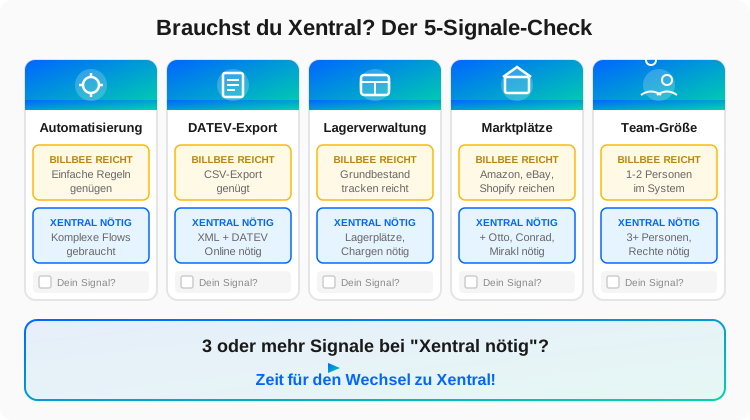
Switching from Billbee to Xentral is a step I regularly support. Here are the clear signals that it's time to make the move:
Signal 1: You're Hitting Automation Limits
When you notice that you're building workarounds in Billbee, manually tagging orders, or your employees repeatedly perform the same manual steps — then you need Flows.
Signal 2: The DATEV Export Is Causing Problems
When your accountant regularly has follow-up questions, when bookkeeping spends hours on rework, or when you have to correct errors in the exports — then the better integration is worth it.
Signal 3: You Need More Professional Warehouse Features
Storage locations, batch tracking, serial numbers, proper stocktaking — if you need these features, there's no way around Xentral.
Signal 4: You Want to Expand to More Marketplaces
Otto, Conrad, MediaMarkt, and other Mirakl marketplaces are not possible with Billbee.
Signal 5: You're Hiring Employees
When user limitations in Billbee become a problem or you need granular access rights, Xentral is the answer.
The Typical Switching Point
In my experience, the switch most often happens at one of the following milestones:
- Around €500,000 in annual revenue
- When 3 or more employees need to work in the system
- When you hit automation limits and realise: "This can't go on like this"
Field Report: A Real Migration
To give you an idea of what a migration involves, here's an anonymised report from one of my projects:
Starting situation: An online shop for pet supplies, running on Billbee for 3 years. Monthly volume of approximately 2,500 orders, 4 employees, a 300 square metre warehouse. Revenue was approximately €1.2 million per year.
The problems: The bookkeeper spent 2–3 days every month on the DATEV export and post-processing. The Billbee rules were no longer sufficient to automatically assign the various shipping options. And the warehouse was a chaotic mess because there were no actual storage locations.
The migration process: The entire migration took 5 weeks. The first week was about setting up the Xentral system: basic configuration, creating users, configuring base settings.
In the second week, we imported the master data: 8,000 items with all variants, 45,000 customer records, and the order history of the past 12 months.
Weeks three and four were dedicated to fine-tuning. We built the Flows — for automatic shipping method assignment, for warehouse processes, for DATEV exports. We also reorganised the warehouse and defined storage locations.
In the fifth week, parallel operation and go-live took place. Both systems ran in parallel for two days, then we made the switch.
The result: DATEV preparation now takes 2 hours instead of 3 days. The warehouse is organised, order picking runs via scanner. The automatic shipping method assignment saves approximately 30 minutes per day.
The costs: Including my consulting fees, the migration cost approximately €8,500. The monthly extra cost of Xentral compared to Billbee is approximately €300 (at 2,500 orders, Billbee costs approximately €350, Xentral Business approximately €649).
The ROI: The time saved in accounting alone (2.5 days × 8 hours × €35) saves €700 per month. Add to that the time savings in order processing and warehousing.
The migration costs were recouped after 4 months.
The Real Differences in Day-to-Day Use
Beyond the feature lists, there are differences that matter in everyday operations but are rarely documented.
User experience: Billbee feels simpler because there are fewer options. That's an advantage for beginners, a disadvantage for advanced users. Xentral has more complexity, but also more possibilities.
Stability: Both systems are reliable. Xentral has sometimes had performance issues during peak times in the past (Black Friday), but this has improved.
Support: Billbee has good community support and responds quickly to tickets. Xentral has more professional support with account managers, but also longer wait times for complex enquiries.
Updates: Xentral develops faster. There are regularly new features, sometimes also breaking changes. Billbee is more stable, but also more conservative in its development.
Community: Both have active communities. The Xentral community is more professional (more agencies and developers), the Billbee community is larger and more accessible.
Documentation: Xentral has better technical documentation (API, developer resources). Billbee has better beginner tutorials.
Frequently Asked Questions (FAQ)
Can I trial Billbee and Xentral in parallel?
Yes, both systems offer free trial periods. Billbee gives you 30 days, Xentral 14 days. I recommend testing both with your real data to get a realistic impression.
How difficult is the migration from Billbee to Xentral?
Technically, the migration is very manageable. Items, customers, and order history can all be transferred. The effort lies more in reconfiguring workflows and adapting processes.
Will I lose data during the migration?
No, if the migration is carried out professionally. I recommend migrating the order history of the past 12–24 months and then keeping Billbee as an archive for a few months afterwards.
Can I start with Xentral and switch back to Billbee later?
Theoretically yes, but in practice almost nobody does this. The typical path is the other way around: start with Billbee, switch to Xentral as you grow.
What if I'm growing quickly — should I start with Xentral straight away?
If you're confident you'll exceed €500,000 in revenue within 12 months, I'd start with Xentral directly. A migration later costs time and money that you'd be saving now.
Are there hidden costs with Xentral?
Not hidden, but there are additional costs: Connects for Shopify and WooCommerce, the Mirakl integration, certain Flows features. On top of that, there may be implementation and consulting costs.
Do I need a consultant for Xentral?
Not necessarily, but it's recommended. Xentral has a steep learning curve, and an experienced consultant saves you weeks of trial and error. For Billbee, you generally don't need a consultant.
How does Xentral handle high order volumes?
Xentral is designed for high volumes. Customers with 10,000+ orders per month use the system without issues. For extreme peaks (Black Friday), you should speak with support in advance.
Can I use certain Xentral features from within Billbee?
No, these are separate systems. You use one or the other. A hybrid approach doesn't make sense.
How long does it take to get up to speed with Xentral?
For the core features, you need about one week. For advanced features like Flows and API usage, you should plan for several weeks. Billbee can be learned in a day.
My Honest Conclusion
After all the details, here's my personal assessment:
Billbee is great for: Beginners, budget-conscious merchants, simple setups, fast starts.
Xentral is great for: Growing businesses, multi-channel professionals, automation enthusiasts, entrepreneurs thinking long-term.
My decision guide:
If you're under €300,000 in revenue and have simple processes: Start with Billbee. You'll save money and time, and if you grow later, you can always switch.
If you're over €500,000 in revenue, operate multiple channels, or DATEV and automation are important to you: Go with Xentral. The higher investment pays off.
If you're in between (€300,000 to €500,000): It depends on your growth plans. Do you want to actively scale? Then Xentral. Are you happy with your current level? Then Billbee is sufficient for now.
Both systems offer a free trial period. Use it, test with your real data, and then decide.
Further Resources
- Xentral Help Center - Official documentation
- Xentral Academy - Video tutorials and training
- Billbee Help Center - Billbee documentation
Related Articles
- Xentral Costs & Pricing in Detail – The complete cost guide
- ERP Selection for SMEs – Xentral vs. SAP vs. others
- Xentral Flows Automation – What Billbee can't do
- Xentral Shopify Integration – Shop connection step by step
Next Steps
- Try Xentral free – 14 days free, all features
- Try Billbee free – 30 days free
- Discuss a migration – Free initial consultation with me
- ERP Migration Service – Professional migration from Billbee to Xentral
- Xentral Setup – Complete setup in 2–4 weeks

Xentral Consultant & E-Commerce Expert
After building my own logistics business (€3.5M revenue, around €35M in customer volume processed through Xentral), I now consult SMEs on Xentral implementation. Practitioner knowledge, not theory.
Questions about this topic? I'm happy to help — free of charge and without obligation.
Book a free consultation