Xentral Flows Guide 2026 | Automation Without Code
Xentral Flows explained: creating workflows, using standard flows, best practices. The complete guide to no-code automation in Xentral.
What Are Xentral Flows? (Short Answer)
Xentral Flows = no-code automation for recurring tasks in your ERP system.
How it works: Trigger → Conditions → Actions
- Trigger: What starts the flow? (e.g. "New order created")
- Conditions: When should it run? (e.g. "Payment status = paid")
- Action: What happens then? (e.g. "Automatically release order")
Time savings example: Automatic order release saves 2–5 min/order → with 50 orders/day = 2–4 hours daily.
Cost: Custom flows from €120–240 (1–2 hours of work for simple flows)
Imagine arriving at the office in the morning to find all overnight orders already processed. Stock levels have been automatically synced to your shop. Customers whose packages shipped yesterday have received their dispatch confirmations with tracking links. And your daily report is sitting in your inbox.
Sounds like a pipe dream? It isn't. These are Xentral Flows – the no-code automation feature that sets Xentral apart from other ERP systems, and one I regularly set up for my clients.
In this guide I'll explain everything you need to know about Flows: how they work, which standard flows you can use right away, and how to get custom automations built for your specific processes.
Why Automation Matters
Before we dive into the details, a word on the importance of automation for growing e-commerce businesses.
As a sole trader or small team, you can manage a lot manually. You open your system in the morning, look at the new orders, release them, print delivery notes, create shipping labels, enter tracking numbers, notify customers. That works at 20 orders a day.
At 50 orders a day things get tight. At 100 orders you either need more staff or better processes. And that's where automation comes in.
Automation doesn't mean replacing people. It means delegating repetitive, rule-based tasks to the system. Your employees can focus on tasks that require human judgement – customer consultation, quality control, problem solving.
The businesses I work with that grow the fastest all have one thing in common: they invest in automation early. Not when they're drowning in work, but proactively, to become scalable.
Expert insight: "A well-configured flow saves 2–5 minutes per order. With 50 orders a day that's 2–4 hours – every day, without a break, without errors." — Fabian, XentralExperte.at
How Do Xentral Flows Work?
Xentral Flows is the no-code automation feature that has been available since September 2025 and is continuously being expanded. It allows you to create if-then rules without writing a single line of code. You can find a full overview in the official Xentral Flows documentation.
Understanding the Core Principle
Every flow consists of three elements: a trigger, conditions, and actions.
The trigger is the event that starts the flow. This can be a manual button press if you want to fire a flow on demand. It can be time-controlled, for example every day at 8 a.m. Or it can be event-based, meaning when something specific happens in the system – a new order is created, a payment is posted, a stock level changes.
The conditions define when the flow should actually execute. Not every order may need to be released automatically – only those where payment has already been received. Not every stock change requires an email – only when the stock falls below a critical threshold.
The actions are what the flow does when the trigger and conditions are met. Change status, send email, sync data, create document, set tag, trigger notification – the possibilities are wide-ranging.
A Concrete Example
Let's take a simple flow for automatic order release:
The trigger is "New order created". The condition is "Payment method equals PayPal and payment status equals paid". The action is "Release order and forward to picking".
This simple flow saves you every individual click needed to manually release PayPal orders. With 50 PayPal orders a day that's 50 fewer clicks – and no more forgotten orders.
Standard Flows vs. Custom Flows
Xentral offers two types of flows: standard flows from the library and individual custom flows.
Standard Flows from the Library
The flow library contains ready-made automations that Xentral has developed and tested. These standard flows can be activated with just a few clicks – though availability is currently limited to certain packages. For up-to-date package information, see the Xentral pricing page. Xentral plans to open flow creation to all customers in the near future.
The advantage of standard flows lies in their simplicity. You activate them with a few clicks and they work reliably because Xentral has tested them extensively. The downside: you can barely customise them. They do exactly what they were built for – no more, no less.
Typical standard flows include automatic dispatch confirmations, stock alerts when minimum stock levels are breached, and automatic order cancellation when payment hasn't been received within a certain period.
Custom Flows for Individual Requirements
When your processes deviate from standard logic, you need custom flows. These are created individually for you and can be as complex as required.
A custom flow might, for example, automatically create a purchase order with your supplier when a specific item's stock falls below minimum. Or it can apply customer-specific pricing logic based on customer group, order volume, or product category. Or it can synchronise data with external systems that aren't connected via standard integrations.
Custom flows can only be created by certified Xentral partners. There's a good reason for this: a misconfigured flow can cause damage – wrong emails sent to customers, incorrectly posted stock, incorrectly released orders. Certification ensures the person creating the flow knows what they're doing.
The Most Important Flow Categories in Detail
Flows can be divided into different categories depending on which area of your business they automate.
Sales and Order Processing
Order processing is the classic starting point for automation. There are many repetitive tasks here that lend themselves well to automation.
Automatic order release is the most common use case. Instead of a staff member checking and manually releasing every order, the flow handles it – under the conditions you define. Only paid orders. Only orders without special requests. Only orders up to a certain value.
Order prioritisation is another frequent application. Express orders can be automatically flagged with high priority. Orders from VIP customers can be pushed to the top of the list. Orders containing products that require cold storage can receive a special tag.
Order routing is relevant for businesses with multiple warehouses or locations. The flow can automatically decide which warehouse fulfils an order – based on availability, distance to the customer, or other criteria.
Logistics and Shipping
In the shipping area, the focus is often on selecting the right shipping method and communicating with customers.
Automatic shipping method assignment saves time every day. The flow checks weight, dimensions, and destination country of the parcel and automatically selects the cheapest or fastest carrier. Small shipments under one kilogram go as standard mail, regular parcels via DHL, bulky freight via a forwarding agent.
Tracking notification is a classic. As soon as the tracking number is stored in the system – whether entered manually or imported automatically from the carrier – the flow sends an email to the customer with the tracking link. This significantly reduces "Where is my parcel?" enquiries.
Automatic document creation also saves time. Delivery notes, shipping labels, and customs documents can be generated automatically as soon as an order reaches a certain status.
Finance and Accounting
There is also automation potential in accounting, though more caution is often warranted here.
Automatic matching of incoming payments works well when reference numbers are correct. The flow matches incoming payments against open items and marks them as paid. For discrepancies – different amounts, missing references – a human is notified.
Automated dunning is a popular flow. Overdue invoices are automatically identified, reminders are created and sent by email, and the status is updated. You only need to handle the exceptional cases.
Accounting exports can be triggered on a scheduled basis. On the first Monday of every month, the flow automatically creates the DATEV export for the previous month and saves it to a defined folder or sends it directly to your tax advisor.
Warehouse and Stock
In the warehouse, the focus is often on prevention – identifying problems before they lead to customer complaints.
Minimum stock alerts are the classic use case. The flow monitors all stock levels and notifies purchasing when an item falls below a critical threshold. To avoid notification fatigue, a condition can be added: only if the last alert for this item was more than seven days ago.
More advanced setups can trigger automatic reorders. The flow detects the need, creates a purchase request with the stored supplier and submits it for approval – or sends it directly, if you prefer.
Stock count reminders can be set up on a scheduled basis. Once a quarter, the warehouse team receives an email with the list of items due for stock count, sorted by ABC class or last count date.
Flows vs. Other Automation Options
Xentral Flows are not the only way to automate processes. Here is a comparison with the alternatives.
Flows vs. Make/Zapier
Make (formerly Integromat) and Zapier are external automation platforms that can connect various systems. They have their place, but Flows have clear advantages for Xentral-internal processes.
Flows are deeply integrated into Xentral. They have direct access to all data and functions without going via the API. This makes them faster, more reliable, and easier to configure.
Make and Zapier are better when you want to connect Xentral with other systems for which there is no native integration. If, for example, you want to create a Google Sheet entry or send a Slack message for every new Xentral order, these tools are the right choice.
My recommendation: use Flows for everything that happens within Xentral. Use Make or Zapier for connecting with external systems.
Flows vs. Direct API Development
For very specific requirements, individual development via the Xentral API may be necessary. This is more flexible than Flows but also more involved.
API development makes sense when you need complex calculation logic, when you need to process large volumes of data, or when you need a bidirectional integration with another system that has specific requirements.
For most standard cases, Flows are the better choice because they are easier to maintain and don't incur ongoing development costs.
Five Flow Ideas Almost Everyone Needs
From my experience, there are certain automations that make sense for almost every Xentral user. Here are my top 5.
1. Automatic Order Release After Payment
You know the problem: you manually release orders after payment is received. This takes time and sometimes someone forgets an order.
The flow solves this elegantly. As soon as the payment status changes to "paid" and the order status is still "open", the order is automatically released.
The time saving is two to five minutes per order – depending on how fast you are otherwise. With 50 orders a day, that quickly adds up to two hours daily.
2. Dispatch Confirmation with Tracking
The problem: customers constantly ask "Where is my parcel?" – even though it's already on its way.
The flow reacts automatically as soon as a tracking number is stored in the system. It sends an email to the customer with the tracking link and passes the information to the shop if relevant.
The result: significantly fewer support enquiries. Customers feel well informed, and your team has more time for real problems.
3. Stock Alert
The problem: you only realise an item is out of stock when customers complain or cancel orders.
The flow monitors all stock levels and sends an email to purchasing as soon as an item falls below minimum stock. To keep it from becoming annoying, a condition is built in: only if the last alert for this item was more than seven days ago.
The result: no more surprises. You always know in good time when restocking is needed.
4. Automatic Cancellation for Non-Payment
The problem: orders with payment method "prepayment" stay open forever. The customer changed their mind but the order is blocking stock and distorting your statistics.
The flow runs once a day and checks all orders. Is an order older than ten days, was the payment method prepayment, and is it still unpaid? Then a cancellation is automatically created, the reserved stock is released, and the customer is notified.
The result: a clean order list with no ghost orders.
5. Automatically Identify VIP Customers
The problem: you want to treat your top customers differently, but you don't always know who they are.
The flow runs after every completed order. It checks the customer's total revenue. If it exceeds a threshold – for example €5,000 – and the customer doesn't yet have a VIP tag, the tag is automatically applied and the sales team is notified.
The result: better customer retention through timely identification of your most important customers.
Best Practices for Successful Automation
From hundreds of flow projects, I've gathered some lessons learned that I'd like to share here.
Start Small and Iterate
The most common mistake: a monster flow with twenty conditions and ten actions. Such flows are hard to test, hard to maintain, and hard to debug when something goes wrong.
Better: three small, focused flows that each do one thing well. You can chain them later if needed.
Test Thoroughly
Before a flow goes live, it should be tested thoroughly. That means: testing with dummy data to verify the basic logic, testing with a real order in a controlled environment, and monitoring the first few days after go-live to catch unexpected behaviour.
A misconfigured flow can cause damage. Sending a wrong email to 500 customers is embarrassing. Posting incorrect stock can be costly.
Don't Skip Documentation
Six months from now you won't remember why you added that one peculiar condition. Document every flow: what does it do? Why does it do that? What exceptions are there?
Plan for Error Handling
What happens when a flow fails? Ideally, you should define this in advance. Set up notifications so you're informed. Define fallback actions where possible. Check logs to understand the cause.
Don't Automate Everything
Automation is not an end in itself. Some decisions require human judgement. A customer complains – should this be automatically escalated, or should a human take a look first?
Automate the obvious and the repetitive. Leave complex decisions to people.
Understanding the Flows Journal
All flow executions are logged in the Flows Journal. This is your most important tool for monitoring flows and identifying problems.
In the journal you can see successful and failed executions, execution time, and details of every individual action. When a flow fails, you can see exactly where and why.
My tip: check the journal regularly, not only when something is obviously wrong. Sometimes there are warnings or partial errors that point to problems before they escalate.
Frequently Asked Questions About Xentral Flows
Can I create flows myself?
Currently, only certified partners can create custom flows. Standard flows from the library can be activated and used by anyone. Xentral has announced plans to open the flow editor to all users in the medium term – an exact date has not yet been announced.
What do custom flows cost?
It depends on complexity. Simple flows with clear logic are often created in one to two hours. More complex automations with many conditions and exceptions take longer. At my hourly rate of €120, simple flows come to €120–240, more complex ones €400 and upwards. I estimate the effort for your specific project during an initial consultation.
How many flows can I have?
There is no technical limit. But less is often more. Many small flows are easier to maintain than a few complex ones, but too many flows become difficult to oversee. Find the right balance for your processes.
Can flows send emails?
Yes, this is one of the most common actions. You can use custom email templates and insert dynamic data – customer name, order number, tracking link, and so on.
What happens when a flow fails?
The flow stops and the error is logged in the journal. You can set up notifications to be informed by email when a flow fails.
Can flows access external systems?
To a limited extent. Flows can trigger webhooks and make HTTP requests, but for complex integrations with external systems, Make/Zapier or individual API development is often better suited.
Do flows run in real time?
Event-based flows run almost in real time as soon as the triggering event occurs. Scheduled flows run at the defined times. The actual execution time depends on complexity and system load.
Can I deactivate flows when I no longer need them?
Yes, flows can be deactivated at any time without deleting them. This is useful for seasonal promotions or when you want to suspend a flow temporarily.
Conclusion: Flows as a Competitive Advantage
Xentral Flows are one of the biggest advantages over simpler systems like Billbee. With the right automation you save hours per week, reduce errors, and scale without hiring proportionally more staff.
My recommendation: start with the standard flows from the library. Activate the dispatch confirmation, the stock alert, the automatic order release. Once you see what's possible, have custom flows built for your specific processes.
Automation is not a one-time task, but a continuous process. With every growing process, with every new requirement, new automation potential emerges. The businesses that understand this early and approach it systematically gain a genuine competitive advantage.
Further Resources
- Xentral Help Center – Official Flows documentation
- Xentral Academy – Video tutorials on automation
- Xentral free trial – 14 days free
Related Articles
- Xentral Costs and Pricing – The complete guide
- Xentral Shopify Integration – Automating your shop connection
- Xentral DATEV Export Troubleshooting – Automating DATEV exports
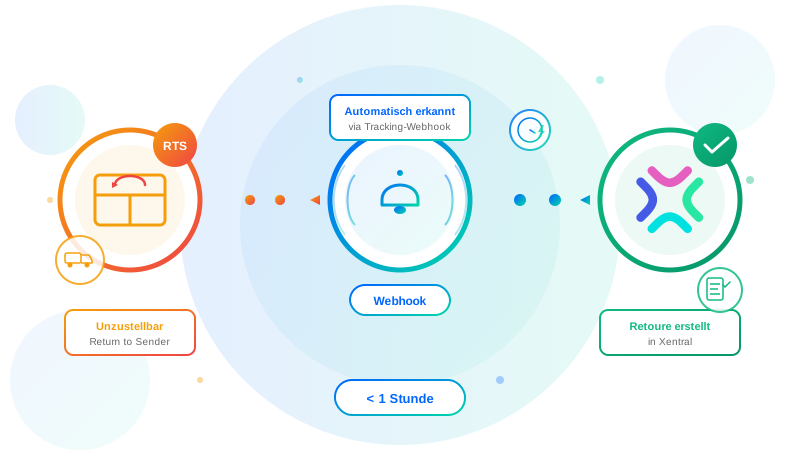
- Return-to-Sender: Automate Returns – A practical example
Next Steps
- Request flow consultation – Which flows do you need?
- Workflow automation as a service – My offering

Xentral Consultant & E-Commerce Expert
After building my own logistics business (€3.5M revenue, around €35M in customer volume processed through Xentral), I now consult SMEs on Xentral implementation. Practitioner knowledge, not theory.
Questions about this topic? I'm happy to help — free of charge and without obligation.
Book a free consultation