Xentral Onboarding - Get Started the Right Way
The key facts at a glance
How long does onboarding take?
2-4 weeks (depending on complexity)
What does it cost?
Individual quote on request
What is included?
Master data, integrations, training, support
Do I need prior knowledge?
No, we guide you through everything
Why do many Xentral implementations fail?
These are mistakes I see regularly - and every single one is avoidable.
Lack of structure
Without a plan, configuration runs wild and rework is guaranteed
Data chaos
Incorrectly imported master data ripples through every process
No testing
Going live without a test phase means chaos in day-to-day operations
Left alone
The Xentral Academy is helpful, but when problems arise you are on your own
Structured onboarding with personal guidance
Here is how I do it differently - and why it makes a real difference for you.
Clear roadmap
Project tracking with all milestones and deadlines
Clean data foundation
Professional master data import with validation
Testing phase included
All processes are tested before go-live
Personal point of contact
One consultant for the entire project
More than 50 successful onboardings guided
I am Fabian, an independent Xentral consultant since 2020. Drawing on my experience running my own e-commerce business (€3.5M revenue, around €35M in customer volume processed through Xentral), I know the typical pitfalls - and how to avoid them.
Learn more about Xentral ERP and the official Xentral Academy
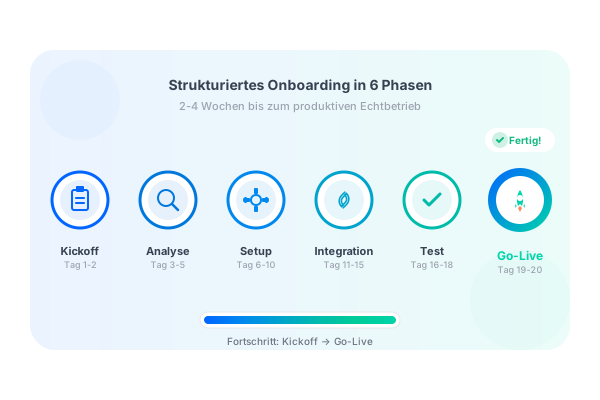
The 6 phasesof onboarding
From kick-off to Go-Live - clearly defined and fully transparent
Kick-off
Days 1-2
- Define goals
- Establish points of contact
- Create project timeline
- Inventory of current processes
Analysis
Days 3-5
- Understand processes
- Identify automation potential
- Plan integrations (shops, marketplaces)
- Document requirements
Base Setup
Days 6-10
- Create company data & users
- Set up warehouse structure
- Document templates (invoice, delivery note)
- Configure basic workflows
Master Data & Integrations
Days 11-15
- Product import with validation
- Import customers & suppliers
- Shop connection (Shopify, WooCommerce, Shopware)
- Marketplaces (Amazon, eBay, Otto)
Testing
Days 16-18
- Run through test orders
- Check workflows
- Test accounting export
- Fix errors & optimise
Go-Live & Handover
Days 19-20
- Staff training (2-4 h)
- Start live operations
- Hand over documentation
- 2-week support phase
What is included?
Technical Setup
- User & permissions management
- Warehouse structure & storage locations
- Order processing configuration
- Invoice templates (CI-compliant)
- Delivery note templates
- Email templates
- Basic workflows (process triggers)
- DATEV export setup
Master Data & Integrations
- Product import (CSV/API)
- Customer import
- Supplier import
- 1x shop integration (Shopify/WooCommerce)
- 1x marketplace (optional)
- Shipping provider connection
- Payment reconciliation setup
Training & Support
- Remote training (2-4 hours)
- Documentation of all settings
- Video recording of training session
- 2-week support phase
- Recommendations for optimisation
Further reading
Deepen your knowledge on individual topics
Onboarding Packages
Standard Onboarding
For businesses with 1 shop and up to 5,000 products
- Phases 1-6 complete
- 2-3 weeks duration
- 1x shop integration
- Training included
Enterprise Onboarding
Multiple shops, marketplaces, >10,000 products
- Extended integrations
- 4-6 weeks duration
- Multiple shops/marketplaces
- Custom workflows
In a free initial consultation we discuss your needs and put together an individual proposal.
With vs. Without Guidance
| Aspect | Self-onboarding | Guided onboarding |
|---|---|---|
| Time required | 4-8 weeks | 2-4 weeks |
| Error risk | High | Minimal |
| Master data quality | Often faulty | Validated & clean |
| Integrations | Trial & error | Best practices |
| Support when problems arise | Community/forum | Direct point of contact |
| Hidden costs | Rework, errors | None |
| Go-live success | Uncertain | Guaranteed |
Common mistakes to avoid
Not validating master data
Leads to errors in orders, invoices and reports
Too many integrations at once
Better to proceed step by step, shop by shop
Skipping the testing phase
Always work with test data for 1-2 weeks first
Not training staff
Acceptance is critical to success
Automating workflows too soon
Understand the process manually first, then automate
Frequently asked questions about onboarding
“The onboarding was extremely well structured. We always had a clear roadmap, knew where we stood, and everything was live within 3 weeks. The testing phase saved us from several nasty surprises.”
Thomas K.
Managing Director, E-Commerce (Electronics), 1,200 orders/month
Related Services
These services complement onboarding or can be booked separately.
Ready for a structured start?
Let's find out together in a free initial consultation what your onboarding should look like.