Which Manual Processes Can Xentral Fully Automate?
Real examples: order import, payment matching, shipping, DATEV, customer emails. Plus: where standard features end and the Xentral API takes over.

Short Answer
Using Xentral's out-of-the-box features (Flows, Process Starters, standard workflows) you can fully automate around 80 % of your recurring back-office tasks – from order import all the way to the DATEV handover. For the remaining 20 % there is the Xentral API with over 200 REST endpoints, webhooks and an MCP server for AI agents. In practice, almost any process is automatable as long as it can be described unambiguously in rules – even if it is not in the standard library.
So you don't stay at a high level, I'll walk you through five concrete areas below – including the tasks that disappear, typical time savings and the matching standard flows.
What You Will Know After Reading This
- Which 5 areas pay off fastest in any SME
- Which standard flows Xentral ships and which ones you can build yourself
- Which 3 trigger types (manual, time-based, event-based) exist
- Where the standard ends and the API takes over – including a realistic assessment
- What you should NOT automate (yes, that exists too)
The Overview: What Xentral Can Automate
| Area | Manual Task | With Xentral | Standard or Custom? |
|---|---|---|---|
| Order intake | Entering shop orders one by one | Automatic import from 30+ shops/marketplaces | Standard (Connect / integrations) |
| Email / PDF orders | Typing data from emails | AI-OCR reads PDF / email → creates order | Standard + custom if needed |
| Order release | Manually releasing paid orders | Auto-release on payment receipt | Standard flow |
| Payment matching | Searching bank lines against invoices | Auto-matching by payment reference/amount | Standard module |
| Dunning notices | Excel list "who owes what" | Multi-stage payment reminders sent automatically | Standard |
| Prepayment cancellation | Manually closing old unpaid orders | Auto-cancellation after X days | Standard flow |
| Pick & Pack | Printing and distributing pick lists | Waves, scanner workflows, packing suggestions | Standard |
| Shipping labels | Creating in DHL/UPS portal | 1-click / fully automatic via shipping module | Standard |
| Tracking email to customer | Copying manually from carrier portal | Auto-email with tracking link | Standard flow |
| Invoice creation | Typing delivery note → invoice | "Invoice in one step" or flow | Standard |
| DATEV export | Building CSV at month-end, uploading | Automatic export & handover | Standard |
| Inventory sync | Excel maintenance between shop / warehouse | Real-time multi-channel sync | Standard |
| Newsletter trigger | Exporting new customers by hand | Webhook → ESP / CRM | Custom (simple) |
| B2B custom pricing | Individual pricing logic per customer | Workflow + API if needed | Standard / Custom |
| Complex ERP bridges | Excel import between 2 systems | API + middleware | Custom |
Example 1: Order Import & Order Processing
The manual problem: Every shop order is transferred to the ERP, stock is checked, the order is released, picked, shipped and an invoice is written. Rule of thumb: 5–8 minutes per order, typical error rate for pure data entry 4–5 % (missed line items, wrong addresses, duplicate bookings).
What Xentral automates:
- Orders from Shopify, WooCommerce, Shopware, Amazon, eBay, Otto, Kaufland and more flow in automatically via the standard integrations – including customer data, line items, payment method and shipping address
- The order is either released immediately based on rules (e.g. "PayPal paid → release") or placed in a review queue (e.g. "new customer > €1,000")
- Email / PDF orders (classic B2B case) are read via AI-OCR, validated and created as an order – including master data matching for customer and product
- Stock is kept in sync in real time across all channels – no more overselling
Typical time savings: Order processing time reduced from 5–8 minutes to under 30 seconds (exceptions only). One B2B distributor was able to reduce the headcount from 3 to 1 employee – while order volume multiplied at the same time.
Standard flow example: "Order release on payment receipt" – as soon as the payment matching identifies a prepayment invoice as paid, the order is automatically released for picking.
Example 2: Payment Matching, Dunning & Prepayment Cancellation
The manual problem: Downloading bank statements, matching line by line against open invoices, managing dunning levels, manually cancelling old prepayment orders. For many SMEs this is half a day per week for the accounting team.
What Xentral automates:
- Bank reconciliation: Xentral pulls bank transactions (via booking accounts and integrations) and matches them automatically against open items by payment reference, amount and IBAN
- Dunning: Multi-stage dunning runs (friendly reminder → 1st dunning notice → 2nd dunning notice → collections) run on a schedule. You only define the stages and the text
- Prepayment cancellation: Classic flow from the library – "Cancel all prepayment orders older than X days, max 50 per run". Runs daily, closes ghost orders automatically and releases reserved stock
- Early payment discount logic: Recognised when payment arrives within the discount period and posted automatically
What remains: Genuine disputes (partial payment with wrong reference, international transfers without a reference). In practice these are 5–10 % of cases – and only those still need human eyes.
Example 3: Warehouse, Shipping & Returns
The manual problem: Printing pick lists, distributing them in the warehouse, creating parcels at the packing station in the DHL/UPS portal, typing the tracking number into the ERP, sending the tracking email to the customer. As volume grows this becomes a bottleneck.
What Xentral automates:
- Picking waves are formed according to rules (e.g. "all express orders before 11 a.m. into one wave, the rest into the afternoon release"). Assignment to warehouse locations, optimised routes, scanner workflow
- Shipping labels: Direct integration with DHL, UPS, DPD, Hermes, GLS, FedEx and more via the shipping module – no switching to the carrier portal. Label printing and tracking capture in one step
- Tracking communication: Once the parcel is handed over, an email with a tracking link goes out automatically – in your own design, in the right language
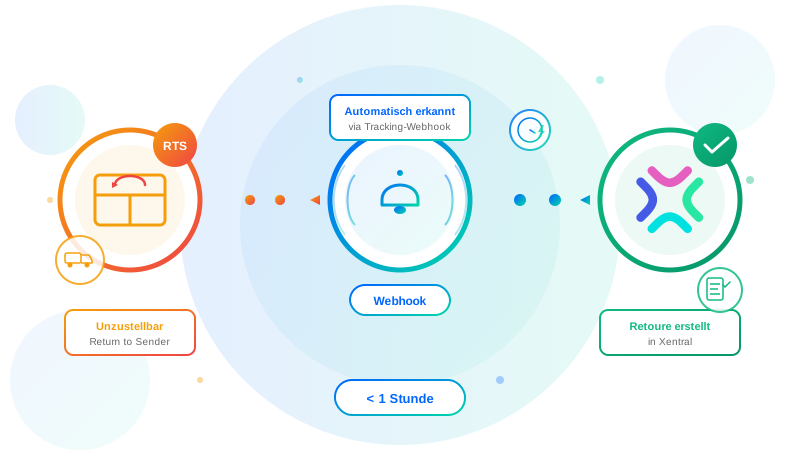
- Returns: The "Return-to-Sender Detection" add-on automatically identifies undeliverable parcels at goods receipt and books them as a return in Xentral. More details in the add-on Return-to-Sender Detection
- Cross-docking & FBA: Routing rules decide per order whether own fulfilment or a fulfilment centre (e.g. Amazon FBA) is used
What remains: The actual physical picking process. But even there, everything except the physical grab is guided by scanner workflows and packing suggestions – error rates typically drop to near zero.
Example 4: Document Creation, Invoice Dispatch & DATEV
The manual problem: Converting a delivery note into an invoice, generating the PDF, sending it by email, exporting in DATEV format and handing it over to the tax adviser monthly.
What Xentral automates:
- Delivery note → invoice in one step: The invoice is generated directly from the shipping process – with correct numbering logic, VAT IDs and OSS logic where applicable
- Bulk invoicing: Standard flow "Create invoice for a list of orders" – e.g. batch-invoice all completed consolidated orders at month-end in one go
- Invoice dispatch: Automatically by email with individual salutation and language, optionally as ZUGFeRD/X-Rechnung for B2G customers
- DATEV export: The classic DATEV interface format is generated automatically and can be pushed to the tax adviser's DATEV cloud area via a cron job. The tax adviser sees current figures without any email back-and-forth
- Credit notes are created automatically when a return is booked (with correct reversal/invoice correction logic)
If you run into problems during the DATEV export (accounts mapped incorrectly, OSS bookings missing), you'll find the most common errors and solutions in the article Xentral DATEV Export – Troubleshooting.
Example 5: Customer Communication, CRM & Newsletter
The manual problem: "New customer in the shop → add to newsletter → create in CRM → send welcome email → add to HubSpot list". Four tools, four clicks, four sources of error.
What Xentral automates:
- Status emails: Order confirmation, shipping notification, delivery delay, return confirmation – all event-based
- CRM sync: Standard process starters for HubSpot Data Sync and Pipedrive – customer and order data flows in both directions
- Tasks / follow-up reminders: Employees are reminded automatically ("Customer X hasn't ordered in 90 days – schedule reactivation email")
- Newsletter trigger: Via webhook, new customers land directly in the ESP (Klaviyo, Mailchimp, Brevo) – with the right segment tag
- Tax services: Taxdoo Sync transfers order data automatically for the EU VAT return – mandatory for every online retailer using marketplaces
The 3 Trigger Types in Xentral Flows
So you understand how a flow actually gets started:
- Manual trigger – you start the workflow with a button click. Useful for bulk actions you want to trigger deliberately (e.g. "invoicing run for all released orders")
- Time-based trigger – cron-style: every X minutes, daily at a set time, weekly. Classic use cases: prepayment cancellation, dunning run, DATEV export, stock sync
- Event-based trigger – reacts to an event in Xentral (order status changed, product created, payment received, webhook received). This is the most powerful mode for real-time automation
If you want to dive deeper: Xentral Flows – The Complete Guide.
The Standard Flow Library
Xentral ships a growing flow library with ready-made templates that you simply adopt and configure with your own parameters. As of 2026 it includes, among others:
- Order release on payment receipt
- Create invoice for a list of orders (Marketplace Workflow SW10036)
- Cancel prepayment orders older than X days
- Low-stock alert when minimum quantity is reached
- Order prioritisation by payment method / shipping method
- Status sync to external system on status change
- Create follow-up reminder for inactive customers
Advantage: You never start from a blank slate. Drawback: if your process is truly individual, you need custom flows or the API.
When the Standard Is Not Enough: The Xentral API
Here comes the part that sounds technical at first glance but in practice turns almost every "can't be done" into "actually it can":
What the API Offers
- Over 200 documented REST endpoints for customers, products, orders, documents, warehouse, accounting, shipping – with approximately 250 more in the pipeline
- Webhooks for event-based real-time integration: external systems are notified the moment something happens in Xentral – no polling, no stale data
- Xentral Connect – the low-code layer on top of the API for fast third-party integrations directly within the Xentral interface
- MCP Server (Model Context Protocol) – enables AI agents to securely access the API. Xentral calls this "Agentic ERP": an agent can not only read data but also trigger processes (address correction, order management, payment reconciliation)
What This Makes Possible in Practice
A few examples from real client projects:
- Custom marketplace integration not supported by any connector (e.g. a niche B2B platform): fetch new orders via API, push back stock, report shipping status – completely automated
- Unified Order API – a single API call creates the customer (or finds an existing one), validates products and creates the order. This is exactly what our add-on Unified Order API does
- Custom workflow between Xentral and an industry CRM: lead is qualified in the CRM → webhook to Xentral → quote is created automatically → on acceptance in the CRM the order is released in Xentral
- Custom reporting / BI integration: regular API export into Snowflake/BigQuery for dashboards that Xentral's standard reporting cannot provide
- EDI/IDOC bridges for enterprise customers who only order via EDIFACT
- AI agents for tasks that cannot be mapped with rules – e.g. classifying incoming complaint emails and automatically initiating the appropriate response
The rule of thumb: If you can describe the process unambiguously, it can be automated – either via a standard flow or via the API. What does not work: processes that actually require gut instinct every single time.
More on custom integrations can be found at Xentral API Development – or book a free initial consultation directly.
What You Should NOT Automate
Honest assessment – many consultancies forget this:
- Special pricing & conditions with strategic significance – if every major customer is negotiated individually, building a rule engine rarely pays off. Better to build workflows for the most common 80 %
- Complaints requiring goodwill decisions – you can partially automate these, but the decision "we'll replace it as a goodwill gesture" belongs with a human
- One-time data migrations – a clean one-off import is cheaper than building a flow for it
- Processes you are still testing manually – stabilise first, then automate. Otherwise you cement a workaround
Realistic Figures from Client Projects
| Area | Before Automation | After Automation |
|---|---|---|
| Processing time per order | 5–8 min | < 30 sec |
| Error rate for order creation | 4–5 % | < 2 % |
| Time for payment matching (SME) | ½ day/week | ~30 min/week |
| Shipping process throughput | Baseline | +30–40 % (warehouse) |
| Headcount with growing volume | Linear | Nearly constant |
| Accounting month-end close | 2–3 days | < ½ day |
These are not marketing figures – they are values I regularly see in projects. Prerequisite: clean master data and a clear set of rules.
Frequently Asked Questions
Do I need technical knowledge to use Xentral Flows?
For standard flows from the library: no. You choose the trigger, set the parameters and activate. For custom flows or API integrations: yes, someone with Xentral expertise (or a developer) helps, especially for the initial configuration.
What is the difference between Process Starters and Xentral Flows?
Process Starters are the classic, time-based background jobs (e.g. order import, payment matching). Xentral Flows is the newer, more modern system with visual configuration, event-based triggers and the standard flow library. Both run in parallel – Flows is the future.
Is this worthwhile for small businesses too?
From around 50 orders per month, the first standard flows almost always pay for themselves. From 200 orders/month at the latest, not automating is more expensive than automating – the payment matching alone saves half a working day.
What does setting up the automations cost?
Standard flows from the library: configuration time only, usually 1–3 hours. Custom flows: 4–8 hours depending on complexity. Larger API integrations: from 1–3 days upwards. Specific rates can be found on Pricing.
Can Xentral also automate processes outside the shop?
Yes – via webhooks and the API you can connect Xentral to virtually anything that has an API: CRM, ESP, BI tools, tax software, banks, logistics providers, EDI platforms, custom apps, AI agents.
Conclusion
Most SMEs underestimate how far Xentral already gets with its standard features – and at the same time overestimate how difficult the remaining percentage is. The honest reality:
- Standard flows cover what 80 % of online retailers need – order intake, payment, shipping, documents, DATEV
- Custom flows close the individual gaps in your own business
- The API handles the rest – including integrations that don't exist as standard
What you need for this: a clear picture of your processes, clean master data and someone who bridges the gap between business and system.
If you want to find out which processes will pay off fastest for you, book a free initial consultation – I'll go through your top-5 time-wasters with you and tell you which ones are standard-flow, custom-flow and API-project territory.

Xentral Consultant & E-Commerce Expert
After building my own logistics business (€3.5M revenue, around €35M in customer volume processed through Xentral), I now consult SMEs on Xentral implementation. Practitioner knowledge, not theory.
Questions about this topic? I'm happy to help — free of charge and without obligation.
Book a free consultation